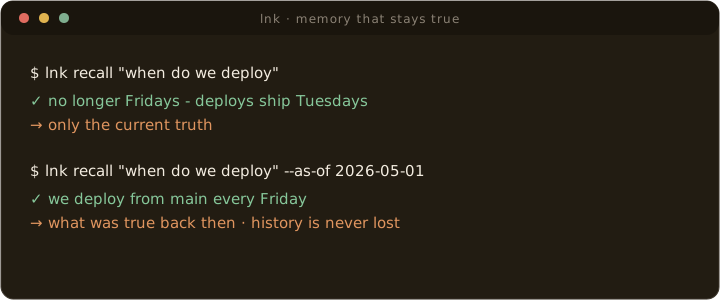
--as-of answers what was true back then.1. Prove The Memory Loop
Start with lnk proof. It creates a clean local workspace, writes one reviewed memory, then recalls it through the same bounded path used by CLI, skills, and MCP. This proves the core product before you configure an agent or open the web viewer.
macOS with Homebrew:
brew install gowtham0992/link/link
lnk proof
You should see Cross-agent memory continuity works and Result: proof passed.
The richer demo is next. It already has raw sources, wiki pages, memories, backlinks, graph data, and a local viewer to inspect:
lnk try
lnk serve link-demo
The Homebrew formula is maintained in the public gowtham0992/homebrew-link tap.
Or from source:
git clone https://github.com/gowtham0992/link.git
cd link
python3 link.py proof
python3 link.py demo
python3 link.py next link-demo
python3 link.py serve link-demo
On Windows from source, use the Python launcher:
git clone https://github.com/gowtham0992/link.git
cd link
py link.py proof
py link.py demo
py link.py next link-demo
py link.py serve link-demo
lnk try creates the demo, checks readiness, runs a compact query and brief, and prints the viewer command plus the first agent prompts. From source, use python3 link.py try or py link.py try.
wiki/ is only a scaffold for local development and personal testing. Generated content in wiki/, raw/, and link-demo/ is ignored by git so private memory is not published by accident.
lnk serve is only for browsing Link in a local web UI. CLI commands, official skills, and MCP-enabled agents work without it because they read the same local wiki/ files directly.
The demo includes one pending memory intentionally, so the review inbox and explain-memory workflow are visible. Run lnk review-memory prefer-local-personal-memory link-demo if you want memory audit to be fully clear.
Open http://127.0.0.1:3000, then inspect /onboard, /brief, /memory, /ingest, /graph, and /health. Open more for prompts, proposal review, audit, captures, profile, log, and all pages. Link accepts localhost too, but the numeric loopback address avoids slow IPv6 fallback in some Safari setups.
lnk start link-demo --task "working on agent memory"
lnk query "why does Link help agents?" link-demo --budget small
lnk brief "working on agent memory" link-demo
lnk benchmark "agent memory" link-demo
lnk health link-demo
2. Make It Yours — One Command
lnk setup is install day and every upgrade after it: it detects every agent installed on your machine — Claude Code, Codex, Cursor, Windsurf, Zed, Kiro, Gemini CLI — and wires them all at once: workspace create/repair, MCP provisioning, and session hooks for agents that have them. It is idempotent, so after any brew upgrade you just run it again.
lnk setup            # every detected agent, wired
lnk setup --preview  # show the plan without writing agent configs
Prefer the guided single-agent flow? lnk onboard checks health, prints the first agent prompts, and previews MCP wiring without changing agent config files unless you pass --write.
lnk onboard
lnk onboard --first-memory "I prefer concise release notes"
lnk onboard --seed-project .
lnk onboard --agent codex
lnk onboard --agent codex --write
lnk onboard --agent claude-code --hooks --write
From source, use python3 link.py onboard on macOS/Linux or py link.py onboard on Windows. The command is safe to re-run: it preserves existing wiki data and only applies safe structural repairs. Add --seed-project . from inside a repo when you want onboarding to create the first source-backed project page. If the local viewer is running, http://127.0.0.1:3000/onboard shows the same setup loop with copy buttons.
3. Seed Project Context
Run lnk seed inside a project so Link has useful source-backed context before you ask an agent to recall anything. It reads allowlisted project files such as README.md, AGENTS.md, CLAUDE.md, .cursorrules, and editor rule files, blocks secret-looking values, writes a generated source page, and rebuilds the graph.
cd /path/to/your/project
lnk seed . ~/link
lnk query "what is this project about?" ~/link --budget small
Seeding does not create durable memories. It gives agents a cited project source to retrieve from; preferences and decisions should still go through reviewed memory proposals.
4. Install Link For Your Agent
From the cloned checkout, run the installer for the agent you use. Re-running the same installer updates code and instructions without replacing existing wiki data.
bash integrations/codex/install.sh
bash integrations/kiro/install.sh
bash integrations/claude-code/install.sh
bash integrations/cursor/install.sh
bash integrations/copilot/install.sh
bash integrations/vscode/install.sh
bash integrations/antigravity/install.sh
Use --project for a repo-local Link install. Project-scoped memory then stays separate from other project memory while still allowing broad user memory to be recalled.
On Windows PowerShell, use the matching install.ps1 script:
.\integrations\codex\install.ps1
.\integrations\kiro\install.ps1
.\integrations\claude-code\install.ps1
.\integrations\cursor\install.ps1
.\integrations\copilot\install.ps1
.\integrations\vscode\install.ps1
.\integrations\antigravity\install.ps1
5. Add One Source
Open the local viewer and use ingest -> Add Raw Source, or write a first note directly:
mkdir -p ~/link/raw
cat > ~/link/raw/first-memory.md <<'EOF'
---
title: "First Link memory"
source_type: note
date_captured: 2026-05-04
---

# First Link memory

I am testing Link as local personal memory for agents.
Raw notes stay local. The agent turns them into source-cited wiki pages.
EOF
Check pending work:
lnk ingest-status~/link/raw/, lnk ingest-status may point to a different pending file first. If first-memory.md was already ingested and you overwrite it, Link marks that raw file as stale and asks the agent to refresh the existing source page.
6. Save One Direct Memory
Use natural language with an agent:
remember that I am testing Link as local personal memory for agents
start with Link before we continue
what does Link remember about local personal memory?
CLI-first agents or Link skills can run the same startup loop directly:
lnk start ~/link --task "working on Link release"Or use the CLI:
lnk remember "I am testing Link as local personal memory for agents." --type preference --scope user --tags onboarding
lnk brief "local personal memory"
lnk recall "local personal memory"
lnk profile
lnk memory-audit
7. Ask The Agent To Ingest
In your agent chat, ask:
ingest raw/first-memory.md into LinkThe agent reads ~/link/LINK.md, creates a source page, updates concepts/entities when useful, updates the index and log, rebuilds backlinks, and validates generated pages.
Return to /ingest after the agent finishes. Link shows which raw files are represented and gives follow-up prompts for proposals or retrieval checks.
8. Verify The Loop
lnk doctor --fix
lnk health
lnk ingest-status
lnk validate
lnk memory-audit
lnk operations
lnk verify-mcp
lnk verify-mcp should report Result: ready when you use MCP. Then ask your agent:
query Link for first Link memoryIf the answer comes from Link, local agent memory is working.
9. Make The Loop Automatic (Session Hooks)
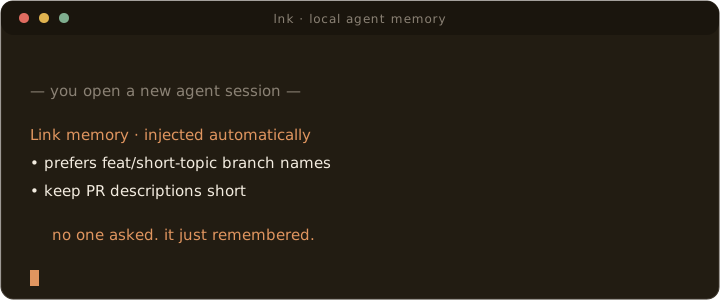
Agents with session-hook support — Claude Code, Codex, and Cursor — can run the memory loop without being asked. --hooks installs hooks that inject a bounded memory brief at the start of every new session and store proposal-only session notes at session end. Empty sessions are skipped, duplicate end events are deduplicated, and durable memory still requires your approval. When the review backlog grows, the injected brief nudges the agent to offer a read-only lnk consolidate pass.
lnk connect claude-code ~/link --hooks --write
lnk connect codex ~/link --hooks --write    # session-start brief (Codex has no session-end event)
lnk connect cursor ~/link --hooks --write
Codex and Cursor hook support is new and follows those vendors' documented hook schemas; if a hook misbehaves there, please open an issue.
10. Optional: LinkBar, the menu bar app (macOS)
Hooks make capture automatic; LinkBar makes reviewing it ambient. It puts the review gate in your menu bar: proposals arrive as a native notification with a one-tap Accept, a global palette (⌥⌘M) recalls or remembers from any app, a live pulse shows which agent sessions are writing right now, and a Status tab reports the health of every Link surface (CLI, workspace, MCP, hooks, recall tier, viewer) with one-click fixes. It runs the same reviewed lnk commands you just wired — nothing new to trust.
brew install --cask gowtham0992/link/linkbarLinkBar ships unsigned (no Apple Developer certificate); the cask clears the quarantine flag on install so it opens like any other app. Prefer building it yourself: cd apps/LinkBar && bash Scripts/bundle.sh --install.
11. Optional: Hybrid Semantic Recall
Lexical recall is always the default and the fallback. Two optional local tiers add paraphrase recall — "how should I structure my pull requests" finds a memory about commit style. The models load offline-only at recall time (a query can never trigger a download), embeddings are plain JSON under .link-cache/, and there is no vector database or service.
lnk semantic ~/link --setup               # installs the extras if needed + fetches the models once
python3 -m link_mcp --semantic-setup --wiki ~/link/wiki   # MCP-only installs
On Homebrew installs the runtime Python refuses direct pip installs (PEP 668), so --setup provisions the extras into Link's managed venv (~/.link-mcp-venv) automatically — the same venv the MCP server runs from, and lnk uses it on the next command. In your own venv, pip install "link-mcp[semantic]" (fast tier) or "link-mcp[semantic-quality]" (quality tier) works as usual before running --setup.
Recall quality is measured, not asserted: see benchmarks/RESULTS.md for the full methodology, numbers, and honest limitations.
12. The Three Questions Everyone Asks
Does Link read my conversations?
Link never sees a conversation. The session hooks do the reading: at session end the agent's own transcript is mined locally and deterministically — no LLM, no network — for statements that look like durable preferences or decisions ("from now on I only push to develop"). Those become proposals in a pending inbox. Nothing is memory until you approve it, and the whole pipeline runs from plain Python files inside your own workspace that you can read (link_core/agent_hooks.py). If you never install hooks, Link only knows what you explicitly tell it with lnk remember.
What happens when I clear context or open a new terminal?
That is the whole point of Link. Context windows are disposable — cleared, compacted, abandoned with every new terminal. Your memory does not live there: it lives in Markdown files under ~/link, outside every context window. When a new session starts, the hook injects a compact brief of relevant memories back in; when an agent needs more, it asks over MCP. Clear context a hundred times — the agent still knows you never push to main, because that fact was never in the context to begin with. It was in a file.
Which project or branch does a memory belong to?
Every memory carries an explicit scope — user (true everywhere: "I prefer concise release notes") or project (tied to one repo: "this service deploys from tags"). Project memories are labeled with their project and don't leak into other repos' briefs. For finer fencing, applies_when conditions (project:, path:, task:) demote a memory to out of context — verify whenever you're outside its territory — so one project's conventions never masquerade as another's. Old checkouts and stale branches can't pollute recall: it's deterministic frontmatter you can open and edit, not classifier guesswork.