MCP Tour
serve.py
The local web viewer is only for humans. MCP clients start python -m link_mcp --wiki ... --surface slim over stdio and read the same Markdown wiki directly.
For agent builders, the stable read/write behavior is summarized in the Link memory contract.
Agent Installers
Use the installer for the agent you use most. Installers create or update ~/link, install link-mcp, write short agent instructions, and preserve existing wiki data.
bash integrations/codex/install.sh
bash integrations/kiro/install.sh
bash integrations/claude-code/install.sh
bash integrations/cursor/install.sh
bash integrations/copilot/install.sh
bash integrations/vscode/install.sh
bash integrations/antigravity/install.sh
Use --project from a repo when memory should be project-scoped.
On Windows PowerShell, use .\integrations\AGENT\install.ps1 instead:
.\integrations\codex\install.ps1
.\integrations\kiro\install.ps1
.\integrations\claude-code\install.ps1
.\integrations\cursor\install.ps1
.\integrations\copilot\install.ps1
.\integrations\vscode\install.ps1
.\integrations\antigravity\install.ps1
If you want a guided setup that also checks the wiki and prints first-run prompts, use lnk onboard --agent AGENT. It previews the target config first; add --write for an explicit update. MCP and CLI work without lnk serve; the local /onboard page is only a browser checklist.
lnk onboard --agent codex
lnk onboard --agent codex --write
lnk onboard --agent cursor --write
If you already have agent instructions and only need MCP wiring, use lnk connect directly.
lnk connect codex ~/link
lnk connect codex ~/link --write
lnk connect kiro ~/link --write
lnk connect claude-code ~/link --write
lnk connect cursor ~/link --write
lnk connect antigravity ~/link --write
lnk verify-mcp ~/link
MCP Only
python3 -m pip install --upgrade link-mcp
python3 -m link_mcp --version
# optional local semantic recall (fast or quality tier):
python3 -m pip install "link-mcp[semantic-quality]"
python3 -m link_mcp --semantic-setup --wiki ~/link/wiki
The semantic extras stay fully local: the embedding model is fetched once by the explicit --semantic-setup command, and the serving path loads it offline-only — a recall can never download anything.
{
  "mcpServers": {
    "link": {
      "command": "python3",
      "args": ["-m", "link_mcp", "--wiki", "~/link/wiki", "--surface", "slim"]
    }
  }
}
On macOS/Homebrew Python, if pip reports externally-managed-environment, use a dedicated venv:
python3 -m venv ~/.link-mcp-venv
~/.link-mcp-venv/bin/python -m pip install --upgrade pip link-mcp
On Windows, use a project or user venv and point your MCP client at that venv's Python:
py -m venv .link-mcp-venv
.\.link-mcp-venv\Scripts\python -m pip install --upgrade pip link-mcp
{
"mcpServers": {
"link": {
"command": "C:\\Users\\YOU\\.link-mcp-venv\\Scripts\\python.exe",
"args": ["-m", "link_mcp", "--wiki", "C:\\Users\\YOU\\link\\wiki", "--surface", "slim"]
}
}
}Predictable Agent Workflow
Memory arrives on its own. Only some agents support session hooks, so Link also pushes through the one channel every MCP agent shares: the first tool response of a session carries a compact memory brief under link_session_brief, whatever tool was called — even status. It happens once per session, is skipped when there is nothing to say, is recorded as a retrieval so lnk wins can prove it happened, and is disabled with LINK_MCP_AUTOBRIEF=off. Agents should treat it as context they already have.
If Link session hooks are installed for the agent (lnk connect <agent> --hooks --write), the startup brief is injected automatically — agents should skip the manual brief call and go straight to bounded task recall. When a brief reports a memory backlog, review(action="consolidate") returns a read-only consolidation plan to walk through with the user.
New MCP configs use the slim surface by default so agents see one obvious read tool and one obvious write tool instead of a long menu of overlapping helpers. The full compatibility surface remains available with --surface full.
Slim agents should use Link in this order:
- Call
statuswhen connecting or troubleshooting. - Call
recallwith an empty query once at the first substantive turn of a session. - Call
recall(query, budget="micro")before broad file reads or asking the user to repeat durable context. - Call
ingestwhen the user drops files intoraw/. - Call
rememberonly after the user explicitly approves durable memory. - At session end, call
admin(action="session_end")orcapture_sessionto propose memory candidates without saving them silently. - Call
reviewfor memory inbox, profile, audit, explain, archive, restore, forget, and visibility workflows. - Call
adminfor backup, migrate, validate, rebuild, graph export, pages, captures, and advanced updates.
MCP Tools
Recommended slim tool set:
status
recall
remember
ingest
review
admin
MCP prompts exposed by Link:
link_start
link_brief
link_remember
link_session_end
link_ingest
link_review
MCP resources exposed by Link:
link://instructions
link://health
link://brief
link://profile
link://project
link_start and link://instructions carry the portable startup loop for clients that support native prompts or resource attachment: check readiness, run one empty-query recall brief, then use bounded recall before broad context reads. If recall finds no useful project context, agents can call admin(action="seed_project", arguments="{"project_root":"/absolute/project/path"}") or ask the user to run lnk seed . ~/link from the repo before retrying recall. link_session_end carries the matching review-gated shutdown loop: capture useful session notes, return proposals, and wait for user approval before durable memory writes.
Full compatibility tool set available with --surface full:
link_status
link_operations
starter_prompts
migrate_wiki
ingest_status
query_link
validate_wiki
backup_wiki
memory_brief
memory_audit
memory_profile
memory_inbox
memory_log
memory_wins
review_memory
explain_memory
search_wiki
recall_memory
remember_memory
propose_memories
capture_session
capture_inbox
accept_capture
redact_capture
delete_capture
update_memory
set_memory_visibility
archive_memory
restore_memory
forget_memory
get_context
get_pages
get_backlinks
get_graph_summary
get_graph
rebuild_index
rebuild_backlinks
Memory write tools return duplicate_candidates or conflict_candidates when review, update, or archive is safer than creating another memory page. The slim remember tool and full remember_memory compatibility tool both accept optional visibility, review_after, and expires_at fields for sharing intent, scheduled re-checks, and temporary memories.
Project-aware tools accept an optional project argument. When set, Link returns broad user/global memory plus memories for that project, while excluding memories from other explicit projects.
Verify Setup
lnk verify-mcp
lnk health
lnk next
lnk verify-mcp --json is useful when an agent or script should read structured issues and next actions.
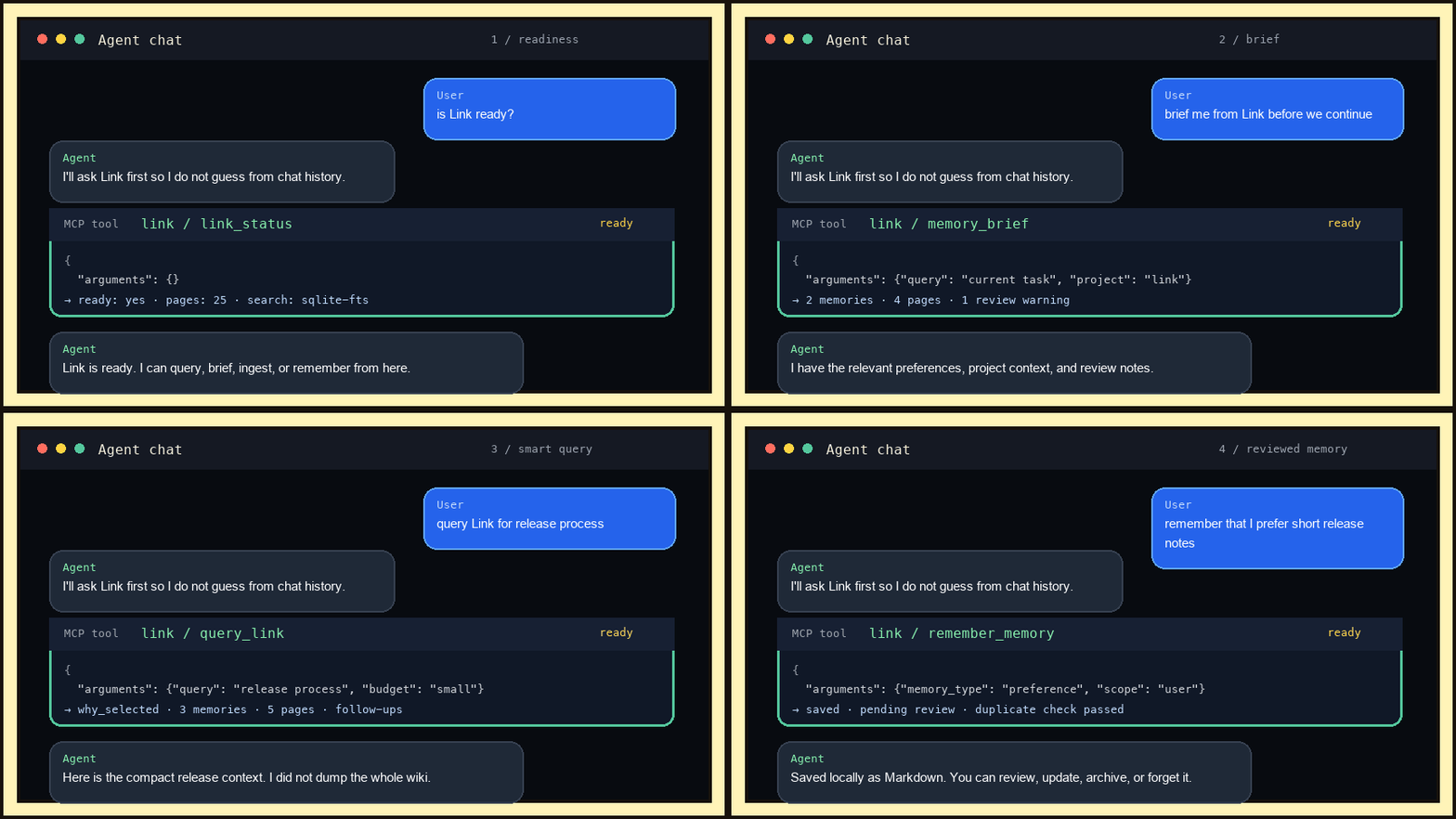
is Link ready?
start with Link before we continue
query Link for my current project context
remember that I prefer short release notes